


What Is VPS Hosting
What Is VPS Hosting https://jesandy.com/wp-content/uploads/2026/10/vps-server-versus-cloud-shared-hosting-food-court-analogy.jpg 1024 576 Jesandy Krisano https://jesandy.com/wp-content/uploads/2026/10/vps-server-versus-cloud-shared-hosting-food-court-analogy.jpg
VPS hosting, or Virtual Private Server hosting, is a type of web hosting that gives you a virtual server with its own allocated computing resources, operating system, and administrative access. It runs on a physical server shared with other virtual servers, but virtualization separates each environment so it can operate independently.
With a typical VPS server, you get an operating system of your choice from the provider’s available options, an IP address, allocated computing resources, and root or administrator access. This level of access lets you install software, configure services, and manage your server according to your needs.
For example, you could use a VPS to host a website, run a custom application, operate background processes, or keep an automation workflow running around the clock.
The important difference is the level of control. With shared hosting, the provider manages much of the environment for you. With a VPS, you have greater control over the server environment, but you also take on more responsibility for configuring, maintaining, and securing it.
That additional control comes at a price. Before looking at the numbers, here’s an easier way to picture what you’re paying for.
Imagine A Restaurant (Comparison Shared, VPS Hosting and Dedicated Server)
To understand how this works, imagine three ways to run a food business.
Shared hosting is like renting single booth in a food court. You get a place to operate, while the building owner manages most of the infrastructure. It’s convenient, but your options are limited by the facilities and rules provided.
VPS hosting is like renting your own kitchen station in a commercial kitchen. You have your own workspace, equipment allocation, and freedom to prepare your menu. You can organize your work around your needs, but you still rely on the building’s electricity, water, cooling, and other shared infrastructure.
A dedicated server is like owning the entire restaurant. You have the whole facility available to you, along with greater responsibility for managing it.
The analogy isn’t exact. A VPS doesn’t necessarily guarantee that every physical resource is completely isolated, and the amount of control depends on the provider and plan. However, it captures the basic trade-off: more independence and control generally come with more responsibility and expense.
Renting your own kitchen station costs more than renting a food court stall. The same principle applies to VPS hosting. The question is where that additional money goes.
Why Is VPS Hosting Expensive? Where Your Money Goes
VPS hosting can cost more than shared hosting because the provider must supply and manage a more capable computing environment while giving customers greater control over how it operates.
However, not every VPS is expensive. To understand whether a plan is worth its price, look at what you’re actually paying for.
#1 Allocated CPU and RAM
CPU and RAM determine how much work your server can handle. Plans with greater resource allocations generally cost more, especially when applications need to process multiple requests or run several tasks simultaneously.
#2 SSD and NVMe Storage
Storage holds your operating system, applications, databases, and files. Faster drives and greater capacity can increase the cost, particularly for applications that handle large amounts of data.
#3 Virtualization and Software Licensing
Virtualization software allows a physical server to host multiple independent virtual machines. Depending on the plan, operating system licenses, control panels, and other commercial software can add to the monthly price.
#4 Data Center Infrastructure
Servers require electricity, cooling, network connectivity, physical security, and ongoing maintenance. These infrastructure costs are part of what keeps your VPS accessible and operational.
#5 Support, Backups, and Reliability
Managed services, technical support, monitoring, and automated backups can increase the price while reducing the work you handle yourself. Check what’s included, because backup and recovery services aren’t always part of a standard VPS plan.
VPS Hosting Cost Breakdown
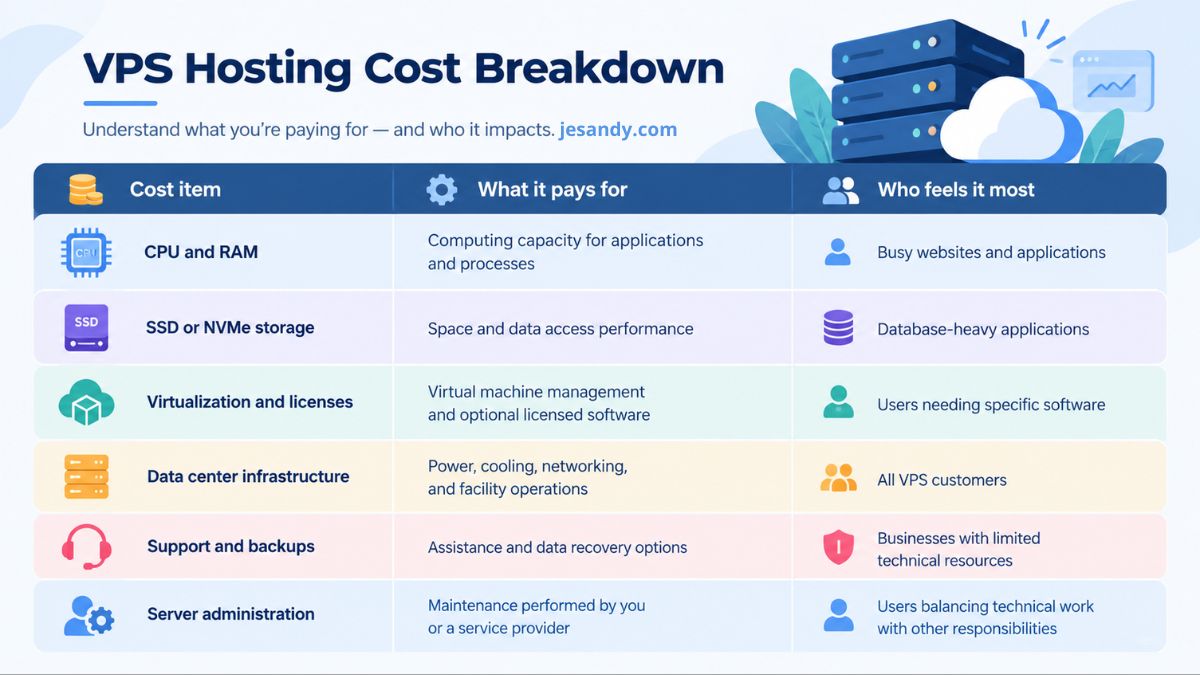
VPS Hosting prices according to resource allocation, hardware, included services, and the provider’s business model.
Ultimately, you’re paying for more than a computer connected to the internet. You’re paying for access to computing resources, the infrastructure that keeps them available, and the degree of control and support included in your plan.
These costs become even more interesting when artificial intelligence enters the picture.
AI Boom: Why Hosting Costs Are Under Pressure
Hosting costs have historically benefited from improvements in hardware, virtualization, and infrastructure efficiency. However, the rapid growth of Artificial Intelligence is changing demand across the cloud computing industry. AI workloads require substantial computing power, memory, storage, and electricity, putting additional pressure on parts of the infrastructure that also support traditional hosting services.
This pressure can affect VPS hosting in several ways:
- Hardware and Component Costs: AI infrastructure requires high-performance memory, fast storage, and advanced processors. As demand for these components grows, hardware procurement and replacement costs can increase, potentially affecting the cost of maintaining conventional servers as well.
- Energy and Data Center Infrastructure: AI workloads consume significant electricity and often require specialized cooling. Growing demand for power and data center capacity can increase operating and expansion costs, which may eventually affect hosting prices.
- Infrastructure Investment and Capacity: Cloud providers are investing heavily in AI infrastructure. Although this does not automatically reduce the supply of traditional VPS servers, competition for hardware, power, and data center capacity can influence how providers allocate resources and price their services.
AI-specific hosting requirements are another part of the picture. Running models directly may require GPU-equipped servers, substantial memory, and specialized configurations, which generally cost more than a basic VPS. But even customers who only need a conventional VPS for websites, applications, databases, or automated background tasks can be affected by broader infrastructure costs.
This does not mean every VPS plan will become more expensive, or that AI is the only reason prices change. Providers have different hardware investments, pricing strategies, and operating costs. However, as AI continues to expand demand for computing infrastructure, it adds another factor to consider when evaluating VPS prices. The important point is that hosting costs depend not only on the features you choose, but also on the wider infrastructure required to deliver them.
When Is a VPS Worth It?
A VPS becomes useful when you need applications to run continuously, greater control over your server environment, or resources that your current hosting plan cannot adequately provide. It can support custom software (such building MVP), APIs, background processes, and AI automations that need to operate independently of your personal computer. The value comes from what those capabilities allow you to build and run, not simply from having a more powerful server.
It is also worth considering when your current hosting limitations delay development, restrict important features, or create performance problems that affect your work. However, a VPS won’t automatically solve every technical issue, and its additional control comes with maintenance and security responsibilities. The question is whether the capabilities justify both the monthly cost and the work required to manage them.
A Simple VPS Readiness Check
Consider the following questions:
- Do you need to run applications or processes continuously?
- Do you need root access or custom server software?
- Are your current hosting resources limiting your work?
- Do you need a dedicated environment for a particular application?
- Do you have a plan for server security, updates, and backups?
If you answer yes to two or more of the first four questions, a VPS is worth investigating. If you also have a clear plan for managing the server, you have a stronger case for moving forward.
This is a practical screening tool, not a universal rule. One essential requirement can justify a VPS, while several minor requirements may not.
When You Should NOT Buy a VPS
A VPS offers greater control, but that doesn’t make it the right choice for everyone. In some cases, renting a more capable server introduces work and expense without providing meaningful benefits.
You run a small website that already works well. If your website has modest traffic, uses standard features, and performs adequately on shared hosting, there may be little reason to upgrade. A VPS won’t automatically improve a site that already has sufficient resources.
You don’t have time to manage a server. An unmanaged VPS can require regular updates, security configuration, monitoring, troubleshooting, and backup management. If you don’t want those responsibilities, consider a managed VPS or a hosting service that handles them for you. Compare the actual service scope rather than assuming every managed plan covers everything.
You expect a basic VPS to run a demanding AI model. A low-cost CPU-only plan is not a substitute for a suitable GPU server. If your primary objective is to run a large model locally, verify the hardware requirements and compare the cost with hosted AI services before committing.
Your application belongs on a specialized platform. Some projects are easier to operate through managed databases, serverless services, specialized application hosting, or dedicated AI inference services. These options can reduce maintenance work, even if their pricing model differs from a conventional VPS.
If you want little deeper our experience from shared hosting to VPS, you need to see this article: Why Would You Need VPS: From Shared Hosting to VPS.
The point is to choose the environment that fits the job, rather than paying for control you don’t need.
If a simpler option already meets your requirements, staying with it is a perfectly reasonable decision. If you do need a VPS, however, there are ways to keep the cost under control.
Ways to Pay Less (and VPS Promos Worth Checking)
Choosing a VPS doesn’t mean you need to begin with an expensive plan. The goal is to pay for the resources and services your project actually requires, while leaving room to grow.
Ways to Reduce Your VPS Costs
Start small and upgrade when necessary.
Estimate your application’s requirements and choose a plan that can reasonably support its initial workload. Monitor CPU, memory, storage, and performance before deciding whether an upgrade is necessary. Starting small is useful when the provider makes upgrading straightforward and your application can tolerate the transition.
Avoid software you don’t need.
A paid control panel can simplify server administration, but it may not be necessary if you’re comfortable managing your server through the command line or using a free alternative. Account for the time and technical knowledge required before deciding that avoiding the license is worth it.
Choose the right server region.
A region closer to your visitors can reduce network latency, which matters for interactive applications and websites. Compare the available regions, pricing, service availability, and connectivity to your audience before choosing. The nearest region isn’t always the cheapest or the most suitable.
Check the renewal price.
Promotional pricing can make the first billing period look attractive. Before committing, compare the initial offer with the standard price, billing term, resource limits, and any additional services you’ll need.
Finally, check whether the provider offers free credits or promotional discounts that can reduce your initial costs.
VPS Hosting Providers Promotion Discount
Before choosing a VPS, make it a habit to search for promo codes credits, check discount price, and new-customer offers. A provider’s regular price is only one part of the decision, and an eligible promotion may reduce the cost of getting started. However, always check the terms, expiration date, eligibility requirements, and renewal price. A code appearing on a coupon website does not necessarily mean it still works.
Based on our research into established providers and their official cloud-server offerings, here are three options worth comparing. Each offers virtual servers, but their pricing, configurations, and available regions differ. Choose according to your project requirements rather than relying on a discount alone.
DigitalOcean Promo $200 Code
Offers Droplets, its virtual machines for websites, applications, development environments, and automation workflows. Worth exploring if you want a developer-oriented cloud service with a range of configurations and deployment options. Check the referral page for any applicable signup credits.
Vultr Discount Packages
Provides cloud compute instances with different configurations, alongside optimized and GPU-enabled options. Worth comparing if you need flexibility across general-purpose applications, compute-intensive workloads, or AI projects.
Hetzner Cloud Promotion
Offers virtual cloud servers with cost-oriented and dedicated-resource configurations, as well as data center locations in Europe, the United States, and Singapore. Worth considering if pricing, resource requirements, and regional availability are important to your decision.
Promotions and pricing can change, so verify the details directly with each provider before signing up. The best deal is not necessarily the one with the largest advertised discount, but the one that gives your project the resources it needs at a reasonable total cost.
Final Thoughts
VPS hosting gives you greater control over a server environment, along with responsibility for how that environment is configured, maintained, and secured. Its cost reflects the resources you rent, the infrastructure behind them, and the additional services included in your plan.
For a small website that already works well, shared hosting may be enough. For a custom application, an always-on automation workflow, or a project that needs more control, a VPS can provide a practical foundation.
The best choice isn’t necessarily the cheapest server or the most powerful one. It’s the option that meets your requirements without adding unnecessary cost or complexity.
